Your phone may have many apps, but you use only a few. A busy home screen can make simple jobs feel harder. You may also open fun apps without thinking.
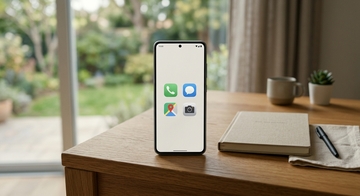
Try making your phone simple instead of buying a new one. First, keep only useful apps on the first screen. These may include calls, messages, maps, and a camera. Move other app icons away from the home screen. On many phones, this does not delete the app. You can still find it later in the full app list. (support.apple.com)
An app icon is the small picture for an app. Some phones also offer Focus mode. This setting pauses chosen apps and their notifications. A notification is a message from an app. (support.google.com)
Here is one example. Mika often checked games during homework. She moved every game off her first screen. She also used Focus mode while studying. Now, she sees only school tools and her music app. Her phone is still useful, but it feels quieter. A simpler phone can help you choose your next action.